Local-first, by design
Your notes never need a server.
Folio writes to local storage as you type. There is no account to create, no sync to babysit, and no cloud between you and the page.
stored at
~/.config/FolioLocal-first note studio / Linux
Folio is a notebook for the way ideas actually arrive. Ten radically different worlds, one calm place to write. Everything saves locally, and nothing leaves your machine.
Linux x86_64 · v1.0.0 · no account, no cloud, no telemetry.
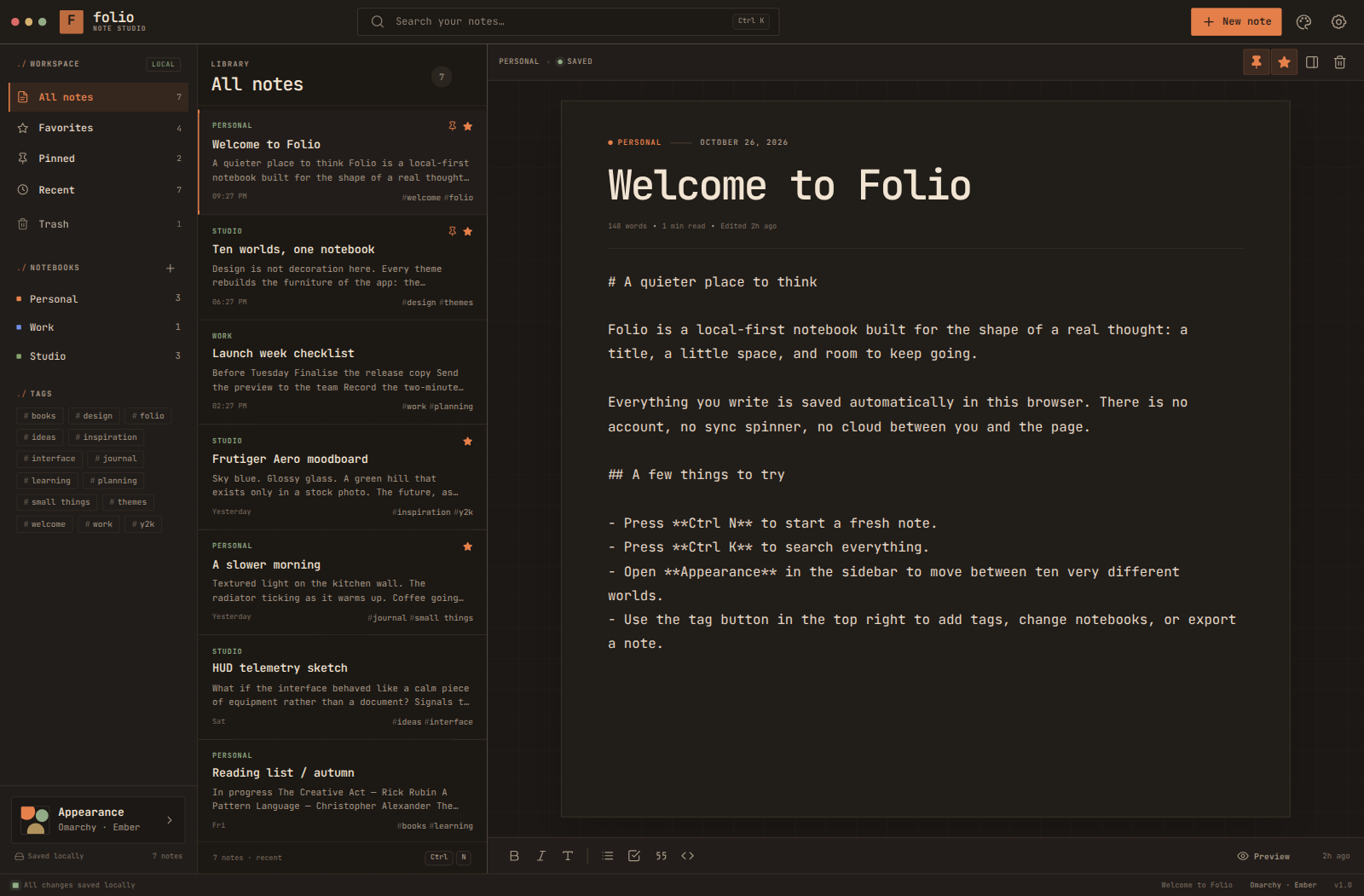
The real app. Omarchy theme, Ember palette.
Built for the page
No accounts, no sync spinners, no notifications asking for attention. Folio is a small, deliberate tool that gets out of the way.
Local-first, by design
Folio writes to local storage as you type. There is no account to create, no sync to babysit, and no cloud between you and the page.
~/.config/FolioTen worlds
Every theme rebuilds the furniture of the app — proportions, navigation, type, atmosphere.
Markdown in, Markdown out
Write in clean Markdown, preview it instantly, and export any note whenever you want.
Keyboard first
Ctrl N for a new note. Ctrl K to search. Ctrl Shift A for another world.
A way back
Deleted something by accident? Restore it from the trash. Permanent means permanent only when you say so.
Quiet by default
No notifications, no gamification, no growth loops. Just a title, a little space, and room to keep going.
Pick a world
Each theme has its own layout, three colour palettes and three type pairings. The words stay the same; the room around them changes completely.
Every world includes three palettes and three type pairings. Mix freely; the layout stays true to the theme.
Linux AppImage / v1.0.0
One file. No installer, no root password, no browser tab required. Download it, make it executable, and start writing.
1694765c2ff8245092c8ea64c74d19177e7faf2380c180e0c4352c96661dee20
Cloudflare Pages caps files at 25 MB, so your browser downloads 12 verified parts and assembles the original AppImage. The checksum above matches the file you get.
The small print
Cloudflare Pages limits each hosted file to 25 MiB. The site splits the 111 MB AppImage into twelve chunks, verifies each chunk with SHA-256 in your browser, and joins them back into the exact original file before saving it.
No. An AppImage is a single executable file. You may need libfuse2 on some distributions. If FUSE is unavailable, run ./Folio-1.0.0-x86_64.AppImage --appimage-extract-and-run.
No. The app, the editor and your notes are entirely local. This download page is the only part that needs the network.
Inside ~/.config/Folio on your machine. There is no account and no server copy. Use Export Markdown inside the app to move individual notes.
Folio includes its own Chromium runtime so it can open in its own window without depending on a browser, Node, Python or any other runtime being installed. That is what makes the single file self-contained.
The page will try, but assembling a 111 MB file in a phone browser can run out of memory. Use a desktop or laptop to download it, then copy the AppImage to the Linux machine where you want to run it.
Not currently. Folio ships as a Linux x86_64 AppImage.